Device Location Verification
Implement precise location-based services by confirming if a device is within a specified geographical area
Introduction
The CAMARA Device Location Verification API provides a standardized mechanism for checking mobile equipment geographic location. API customers are able to verify whether the location of certain user device is within the area specified by the provided coordinates (latitude and longitude) and some expected accuracy. The API response is a boolean: The equipment is within (or not) the accuracy radius with a center point at provided latitude/longitude.
API Authentication
HTTPS requests to the REST API are protected with CIBA 3-Legged OAuth.
In short, the API Invoker (e.g. Application Backend or Aggregator) before to request Device Location Verification, needs to request a Three-Legged Access Token from Orange Authorization Server. The process follows the OpenID Connect Client-Initiated Backchannel Authentication (CIBA) flow.
Step 1: request the back channel authorization from the application
To authenticate the end-user a POST request must be sent to the bc-authorize endpoint from the user device. This request must provide required parameters.
The API Invoker provides in the authorization request (/bc_authorize) a login_hint with a valid User identifier together with the application credentials (client_assertion & client_assertion_type) and indicates the Purpose for processing Personal Data. The Orange implementation follows the CAMARA scope definition. The scope must be set to:
opendid dpv:<dpvValue> <technicalParameter>. dpv stands for Data Privacy Vocabulary.
For current implementation dpv:FraudPreventionAndDetection dpv value is managed, which means that:
- to check the Device Location Verification, the scope in the
bc-authorizemust be set toopenid dpv:FraudPreventionAndDetection location-verification:verify
Note on JWT usage via client assertion:
client_assertion is a JWT used by a client to authenticate itself to an authorization server, while client_assertion_type specifies the type of assertion being used, typically indicating it is a JWT. Together, they facilitate secure client authentication in OAuth 2.0 and OpenID Connect protocols. API consumer as to define JWK keystore in settings tab of the application in Orange Developer
curl -X POST "https://api.orange.com/es/openapi/oauth/v2/bc-authorize" \
  --header 'Accept: application/json' \
  --header 'Content-Type: application/x-www-form-urlencoded' \
  --data-urlencode 'login_hint=tel:+346xxxxxxxx' \
  --data-urlencode 'client_assertion_type=urn:ietf:params:oauth:client-assertion-type:jwt-bearer' \
  --data-urlencode 'client_assertion=eyJhbGciOi...zif0Tjxzw' \
  --data-urlencode 'scope=openid dpv:FraudPreventionAndDetection location-verification:verify'
The Orange authorization server will send back to the client application an authorization req_id.
200
Content-Type: application/json
{
  "auth_req_id":"69957d77-fea4-4a4c-8cd2-b29f22e61307",
  "interval":2,
  "expires_in": 120
}
Note: this authorization code is provided even if the end user did not yet provided consent.
Step 2: Request the OAuth access token
Once the client application got the authorization code, it has to get the access token protecting the resource. In order to retrieve it, the client application triggers a POST request to the token endpoint.
curl -X POST "https://api.orange.com/es/openapi/oauth/v2/token"
  --header 'Accept: application/json' \
  --header 'Content-Type: application/x-www-form-urlencoded' \
  --data-urlencode 'client_assertion_type=urn:ietf:params:oauth:client-assertion-type:jwt-bearer' \
  --data-urlencode 'client_assertion=eyJhbGciOi...zif0Tjxzw' \
  --data-urlencode 'auth_req_id=69957d77-fea4-4a4c-8cd2-b29f22e61307' \
  --data-urlencode 'grant_type=urn:openid:params:grant-type:ciba'
If the transaction succeeds, in the POST response, the acccess_token is provided.
200
Content-Type: application/json
{
  "access_token":"*****",
  "token_type":"Bearer",
  "expires_in": 119
}
Step 3: Access protected resources using OAuth access token
In order to call our API, the access_token is mandatory.
Specific documentation about Device Location Verification resource is provided below.
API Description
Summary of resources
This API has one resource verify. verificationResult attribute provides in the response information about mobile equipment location check.
Summary of methods and URL
| Use case of operation | URL method |
|---|---|
| I want to check location of a device from a MSISDN number, an external identifier or an IP (+port) | POST "https://api.orange.com/camara/oes/location-verification/v2/verify" |
Device Location - Verify
Summary of request body parameters
| Name | Description | Type | Mandatory |
|---|---|---|---|
| device | An object with four fields, each of them make possible to pass device identifier in different format: networkAccessIdentifier, phoneNumber, ipv4Address and ipv6Address | See below information on device | Yes |
| area | Used to define the geographical area to be verified. | See below information on area | Yes |
| maxAge | Maximum age of the location information which is accepted for the location retrieval (in seconds). | integer | No |
Note on maxAge:
- Absence of maxAge means "any age" is acceptable for the client. In other words, this is like maxAge=infinite. The system still return lastLocationTime in the response. If the system is not able to provide location a error 404 with code LOCATION_RETRIEVAL.DEVICE_NOT_FOUND is send back.
- maxAge=0 means a fresh calculation is requested by the client. If the system is not able to provide fresh location an error 422 with code LOCATION_RETRIEVAL.UNABLE_TO_FULFILL_MAX_AGE is send back.
Definition of the area structure:
| Name | Description | Type | Mandatory |
|---|---|---|---|
| areaType | Type of this area. Only CIRCLE value is managed | string | Yes |
| center | Structure to define circle center coordinates | See below information on center | Yes |
| radius | Accuracy expected for location verification in meters. Must between 2 000 and 200 000. | number | Yes |
Definition of the center structure:
| Name | Description | Type | Mandatory |
|---|---|---|---|
| latitude | Latitude component of location. Must between -90 and 90. | number | Yes |
| longitude | Longitude component of location. Must be between -180 and 180. | number | Yes |
User equipment identifier
The following table provides details about the device:
| Name | Type | Format |
|---|---|---|
| networkAccessIdentifier | string | External Identifier format of the GPSI |
| phoneNumber | string | Subscriber number in E.164 format (starting with country code). Mandatory prefixed with '+' |
| Ipv4Address | string | IPv4 address may be specified in form <address/mask>. If address we expect an IPv4 number in dotted-quad form 1.2.3.4. Only this exact IP number will match the flow control rule. If address/mask - an IP number as above with a mask width of the form 1.2.3.4/24. |
| Ipv6Address | string | IPv6 address, following IETF 5952 format, may be specified in form <address/mask>. If address, the /128 subnet is optional for single address (2001:db8:85a3:8d3:1319:8a2e:370:7344 or 2001:db8:85a3:8d3:1319:8a2e:370:7344/128). If address/mask, an IP v6 number with a mask (2001:db8:85a3:8d3::0/64 or 2001:db8:85a3:8d3::/64 ) |
Example of body query
{
"device": {
    "phoneNumber": "+34012345678"
},
"area": {
  "areaType": "CIRCLE",
    "center": {
      "latitude": 48.80,
      "longitude" : 2.26999
    },
  "radius" : 2000},
"maxAge": 3600
}
::
Request
curl -X POST "https://api.orange.com/camara/oes/location-verification/v2/verify"
-H "Authorization: Bearer {your access token}"
-H "Cache-Control: no-cache"
-H 'accept: application/json'
-H 'Content-Type: application/json'
-d  '{
  "device": {
    "phoneNumber": "+34012345678"
  },
  "area": {
    "areaType": "CIRCLE",
    "center": {
      "latitude": 48.80,
      "longitude" : 2.26999
    },
    "radius" : 2000
  },
  "maxAge": 3600
}
Response
200 Location verification successful
Content-Type: application/json
{
  "lastLocationTime": "2026-01-05T14:28:46.699450286Z",
  "verificationResult": "TRUE"
}
Fields description
The API response attributes are described in this table:
| Name | Description | Type | Mandatory |
|---|---|---|---|
| lastLocationTime | last location time of the device from the network. Will be between the time of the request and the time of the request + maxAge | string (date-time) | Yes |
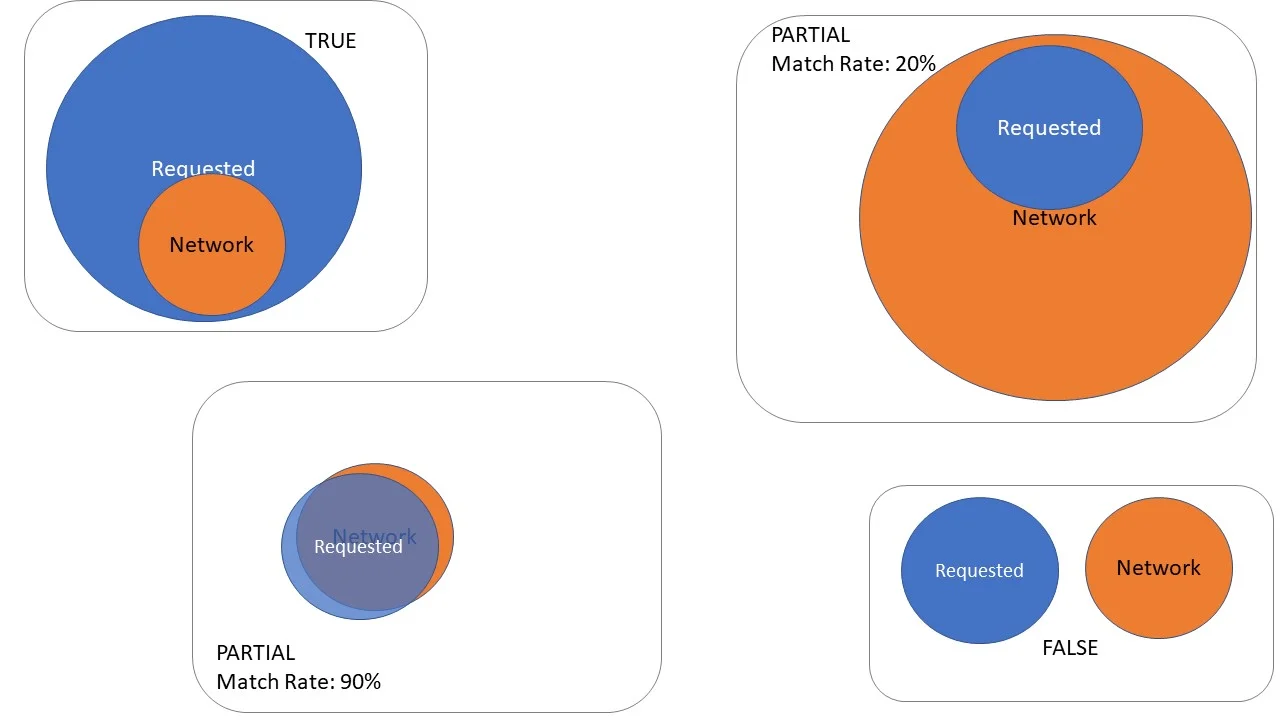
| verificationResult | If TRUE the mobile equipment is within the circle with radius=accuracy and circle center=latitude, longitude. If FALSE the mobile is not in this zone. If PARTIAL the mobile could be within the zone - in this case a matchRate is send also. If UNKNOWN the network cannot locate the device | number | Yes |
| matchRate | Estimation of the match rate between the area in the request (R), and area where the network locates the device (N), calculated as the percent value of the intersection of both areas divided by the network area, that is (R ∩ N) / N * 100. Included only if VerificationResult is PARTIAL | integer | No |
The following diagram illustrates verificationResult and matchRate:
Note:
- If the network is not able to localize the equipment within the max age requested, status 404 is sent.
- If the localisation service is not live and running error 503 is sent
Most frequent errors
If invalid input are provided in particular for the ueId a 400 error is triggered.
HTTP/1.1 400 Invalid input
Content-Type: application/json
{
  "code": "INVALID_ARGUMENT",
  "status": 400,
  "message": "Invalid input"
}
If the network back end is not able to localize the equipment, a 404 error is sent.
HTTP/1.1 404 Not found
Content-Type: application/json
{
  "status": 404,
  "code": "NOT_FOUND",
  "message": "Location outdated"
}
If the localisation service is down, a 503 error is sent.
HTTP/1.1 503 Service unavailable
Content-Type: application/json
{
  "code": "UNAVAILABLE",
  "status": 503,
  "message": "Service unavailable"
}
There are some cases where your client application will no longer gain access to API resources, and get an error back.
Please check the following points:
- Here, you attempt to use an expired or revoked access_token and you get an invalid token error. You will have to request a new access_token. As an example:
HTTP/1.1 401 Unauthorized
Content-Type: application/json
{
  "code": "UNAUTHENTICATED",
  "status": 401,
  "message": "Authorization failed: ..."
}
- Here, you removed your subscription to the API so that the capability to generate an access_token is not allowed anymore. As an example:
HTTP/1.1 403 Forbidden
Content-Type: application/json
{
  "code": "PERMISSION_DENIED",
  "status": 403,
  "message": "Operation not allowed: ..."
}